
In a packaging plant, the main plan is often built once a day or once a week. Then production moves away from it: a machine fails, board arrives late, a rush order pushes in, a setup takes longer than planned. The plan drifts, and on-time delivery suffers. This guide is for planners and production managers in folding carton, label, film and corrugated plants. It shows what makes planning hard in packaging and which rules keep the plan stable.
Key points
- In packaging, the sequence at the press and the die-cutter decides the setup time: equal colors, coatings and foils belong together.
- Tools, gang sheets and waiting times after printing are hard rules. A plan that breaks them does not hold on the shop floor.
- The best times for the plan are in your shop floor data collection (BDE), not in the master data catalog.
- Software calculates the plan faster and more completely; the planner keeps the decision.
What production planning covers in a packaging plant
Production planning and control (PPS) decides which order runs on which machine and when. Rough-cut planning works in weeks and capacities: is there enough press capacity for next month? Detailed scheduling works in hours and minutes: which order runs on the press tomorrow at 6 a.m., and in which sequence do the next ones follow?
The ERP system manages orders, bills of material, stock and due dates. For detailed scheduling it is usually not enough: it does not know the setup time between two particular orders, and it does not optimize a sequence across all machines. Planning boards, spreadsheets or scheduling software with machine loading and sequencing fill this gap, often called APS (advanced planning and scheduling).
Why packaging is hard to schedule
A packaging order passes through several stages, and every stage has its own machines. Many variants, small batches and short lead times add to it. The stages depend on the segment:
| Segment | Typical stages | What drives the setup | Waiting times |
|---|---|---|---|
| Folding carton and label | Printing, finishing, die-cutting, gluing (labels: roll slitting) | Color, printing plate, coating, cold foil, hot-foil stamping, cutting die | Drying after printing |
| Film | Extrusion, printing, lamination, slitting (rolls or bags) | Color, printing plate | Curing after lamination |
| Corrugated | Corrugator, printing, die-cutting, gluing | Flexo plate, cutting die | depending on the plant |
Three things make planning hard. The setup time depends on the order before, not only on the order itself. Tools such as cutting dies and flexo plates are scarce. And between the stages there are waiting times a plan must keep. With hundreds of parallel orders, no one can keep all these dependencies in their head or in a spreadsheet.
Setup times: how the sequence at press and die-cutter decides
On a printing press, the change between two orders with the same colors and the same coating is short. If color, coating and foil change at once, it takes many times longer. The properties that drive the setup are called setup features: color, printing plate, coating (for example UV coating or special coating, by coating category), cold foil, hot-foil stamping, format and tool.
This leads to the most important rule of sequencing: orders with the same setup features belong together. Planners form production groups for this, for example all orders with UV coating in one morning. Every group saves setups.
Two questions remain. First: where do the setup times come from? A setup matrix in the master system is soon out of date and rarely knows every combination. Times learned from the setup events in the BDE are more precise, per machine group and depending on the order before. Second: how far may a group go? A large group saves setup time but can start an urgent order too late. Good planning weighs setup time against the due date instead of putting one of them first at any cost.
Cutting dies, flexo plates and gang sheets
A cutting die usually exists once, sometimes in a few copies. It can run on only as many machines at the same time as there are copies. Two orders with the same die on two die-cutters at the same time are possible in the plan, not in the hall. The same applies to flexo plates in corrugated. A reliable plan therefore treats tools as a hard rule and checks every slot against it.
Gang sheets are special to folding carton and label production: many small items sit on one common print sheet. They are printed together and planned together; their due date is the earliest due date of their items. An optimization must not split a gang-run sheet, even if single items would fit better alone.
Drying, curing and buffers between stages
After printing, the ink needs time to dry; after cold foil and after film lamination, the bond needs time to cure. Only then may the next stage start. How long depends on ink, coating and material; your plant knows these values best.
In planning, such waiting times are stored as buffers per step: after printing, after cold foil, at the end of an order. What matters is that the plan does not only know the buffers but reports when a change cuts them short. Otherwise a die-cutting start set too early only shows at the machine.
Due dates, rush orders and breakdowns
No plan survives the day unchanged. What counts is how fast and how safely it can be adjusted. Three tools have proven their worth:
- Frozen zone: a period from now on in which nothing is rescheduled. The next hours stay stable, material and staff are prepared.
- Fixed operations: what is already running or firmly promised stays in place. Only the rest is replanned.
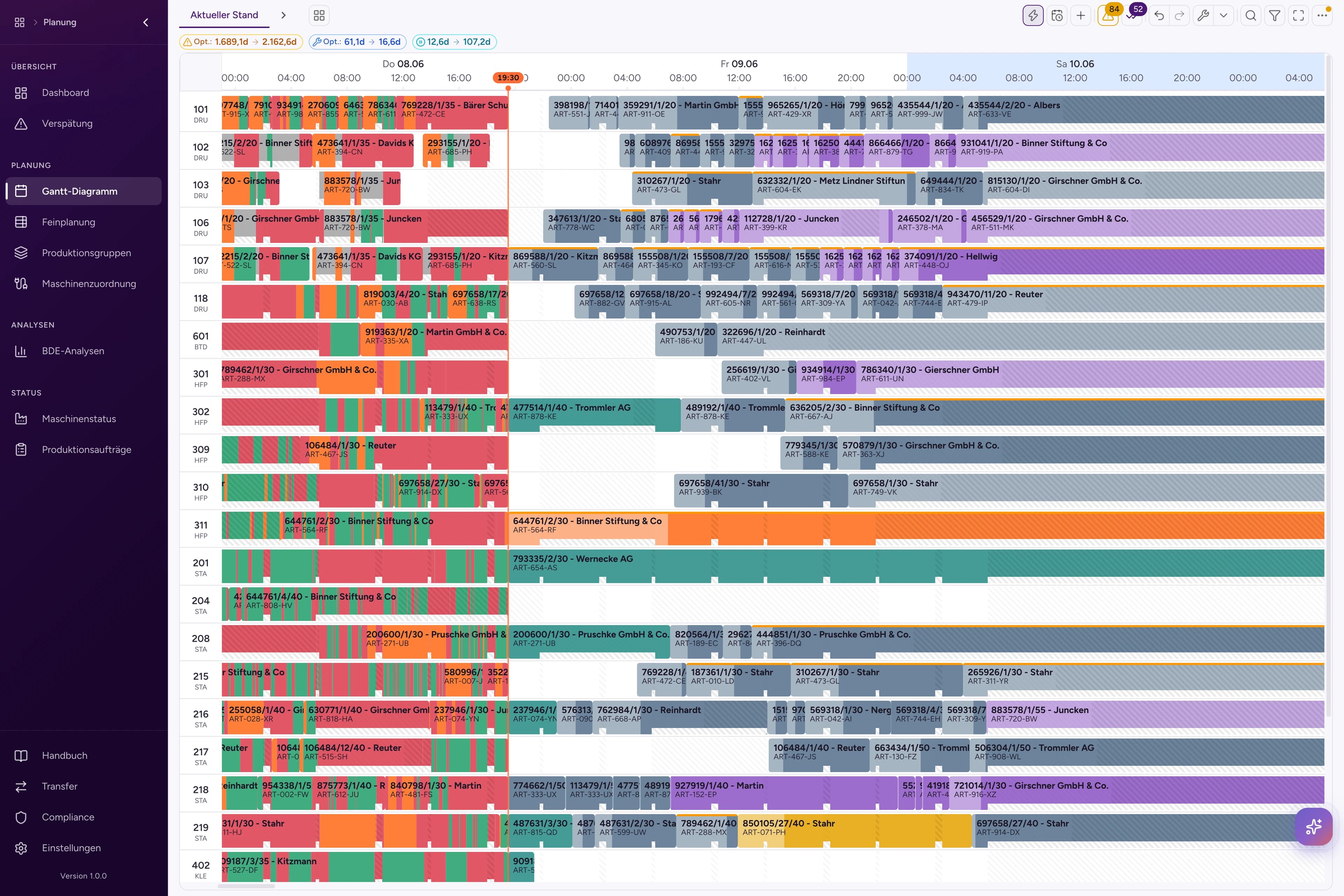
- Placing with a preview: a rush order is dragged to a slot, and the planner sees beforehand what changes: the setup time before and after, and the orders that move.
An example: a customer brings an order forward by two days. The order needs printing with UV coating, die-cutting and gluing. On the press you look for a slot where the setup features match, next to another order with UV coating. Then you check the consequences: does the next order still meet its due date? Is the cutting die free at the planned time? Is the drying time before die-cutting kept? Will the board be in the plant by then? Only when all four answers fit is the new slot reliable. This check takes the most time by hand, and it is exactly what software can do in seconds.
The BDE reports breakdowns: downtime with its reason, a later start, a longer setup. They only become visible when plan and actual state lie on top of each other on one planning board, not in two systems. How often you replan depends on the plant. A proven rhythm: let the whole plan be recalculated at night and check it in the morning; during the day, move single orders only.
Material and capacity: board, film, shifts
An order can only start when its material is there: the board, the film, the coating. A good plan projects the stock across the whole plan and marks every operation: material available, ordered, missing or not checked. The goods receipt becomes the earliest start.
On the capacity side, the shift calendar per machine counts: a press may run three shifts, the folder-gluer two. If a two-shift machine is always at its limit, a third shift is worth a look. That decision should rest on the figures of the plan, not on the feeling at the end of a long week.
The data scheduling needs: ERP and shop floor data
For detailed scheduling you need five kinds of data:
- Orders with quantities, due dates and routing from the ERP,
- Material: bills of material and stock,
- Machines and what they can do,
- Shifts: the work calendar per machine,
- Feedback from shop floor data collection (BDE): start, stop, setup, downtime with its reason.
The BDE is the key to realistic times. An item's run time can be set as the median throughput of past runs, stops included. Where data is missing, the target times from the ERP apply, and the plan should show it that way. Showing missing values as missing is more honest than replacing them quietly with assumptions. Master data needs a check too: if the coating in the bill of material differs from the master data, this should show before planning, not at the machine.
The ERP does not have to be replaced for this. Scheduling software such as Riventic Flow reads the data from BOXSOFT®, SAP or Odoo, from other systems via a REST API, and writes the released plan back.
How to measure good planning
Whether a plan is good does not show in the morning but at the end of the week. These measures have proven their worth:
- On-time delivery: the share of orders finished by the promised date. For most packaging customers it is the most important measure.
- Lateness: how far late orders lie behind their due date. Two orders one day late each are not the same as one order two weeks late.
- Setup share: how much machine time goes into setups. It shows whether the sequence groups setup features.
- Idle time: time a machine is staffed but waits for material, a tool or the stage before.
- Lead time and total duration (makespan): how long an order takes from start to finish, and how long the whole plan takes.
- Planning effort: how many hours a day go into planning itself.
The goals often pull against each other: fewer setups can mean more lateness, a shorter total duration more setups. So decide what matters to you and how much, and measure the effect of every change on all the measures, not only on one.
From spreadsheets to scheduling software: what to look for
Spreadsheets and the magnetic planning board are flexible and familiar. They reach their limits when the plan costs hours every day, changes cannot be traced, and planning knowledge sits in a few heads. Check scheduling software for packaging against these points:
- Does it model every stage and its rules: precedence between stages, cutting dies, buffers, gang sheets, frozen zone?
- Does it learn setup and run times from your BDE data?
- Does it optimize the whole plan across all machines, not only one machine?
- Are there planning versions, a comparison and a change log?
- Does the planner decide on the plan before it goes to the ERP?
- Does your ERP stay in place, with a ready connection?
- Does the software run in your plant (on premise) if your IT asks for it?
- Does an optimization run for hundreds of orders take minutes, not hours?
Planner and AI: who decides what
An AI can work through thousands of sequences and check each against every rule. No person can do that in the time. The planner, on the other hand, knows the customers, the priorities and the situation in the hall. Good planning combines both: the AI proposes and checks, the planner decides and releases. This is called "human in the loop".
In practice: the planner weights the goals, such as lateness, setup time, idle time, the total duration of the plan (makespan) and robustness against disruptions. From this, the AI calculates a new planning version. The planner compares it with the current plan, adjusts it or discards it. Only the planner's release writes the plan to the ERP, with a backup before it. The planning knowledge stays in the system, not only in a few heads.
Riventic Flow works this way and is in use in the packaging industry. From our project experience: up to 50% less lateness, up to 40% less idle time, up to 10% less setup time and 40% less manual planning effort. The team's research background includes the dissertation on AI-based production scheduling; how simulation checks every plan beforehand is shown on the simulation page.
FAQ
What is the difference between PPS and APS?
PPS (production planning and control) is the general term for planning orders, material and capacity. APS (advanced planning and scheduling) means software that does detailed scheduling with optimization: sequences, machine loading, due dates under all constraints.
Do I need shop floor data collection (BDE)?
Not for a first plan: then the target times from the ERP apply. For realistic setup and run times, and for a plan that shows deviations live, yes.
Can setup times be learned from data?
Yes. From the setup events in the BDE you can determine, per machine group, how long a change from one order to the next takes, depending on the setup features of both orders.
How long does an optimization take?
In Riventic Flow, an optimization run over the whole plan takes less than 5 minutes; the time limit is configurable. For up to ten operations, Flow finds a new slot without recalculating the whole plan.
Does the ERP have to be replaced?
No. The scheduling software sits on top of the ERP, reads its data and writes the released plan back: dates and sequence of the operations. More on the page AI production planning for the packaging industry; an overview of the planning board is in Riventic Flow at a glance.